
Deploying Kafka in Production: From Zero to Hero (Part 5)
Deploy a production-ready Apache Kafka cluster on Google Kubernetes Engine (GKE) using Strimzi Operator. Learn KRaft mode, automated scaling with Cruise Control, high availability, and best practices for secure, scalable Kafka on Kubernetes.


Kafka in Production - We are Building a Scalable, Secure, and Enterprise Ready Message Bus on Google Cloud Platform. Now we take it to the cloud, namely to google cloud hyperscaler / google kubernetes engine.
opensight.ch - roman hüsler
Table of Contents
- Part 1 - Kafka Single Instance with Docker
- Part 2 - Kafka Single Instance with Authentication (SASL)
- Part 3 - Kafka Cluster with TLS Encryption, Authentication and ACLs
- Part 4 - Enterprise Authentication and Access Control (OAuth 2.0)
- Part 5 - Google Cloud Production Kafka Cluster with Strimzi
- Part 6 - Kafka Strimzi Observability and Data Governance (upcoming)
TL;DR
Although I recommend reading the blog posts, I know some folks skip straight to the “source of truth”—the code. It’s like deploying on a Friday without testing.
So, here you go:
Introduction
Apache Kafka is a powerful event streaming platform, but running it in production is a different challenge altogether. We will start with the basics, but this is not a playground—we work our way towards building an enterprise-grade message bus that delivers high availability, security, and scalability for real-world workloads.
I'm not a Kafka specialist myself - I learn on the go. Well - as this is already blog part 5 I have to say I have learned a lot about running kafka in production in an enterprise environment in the meantime. As is often the case with opensight blogs, you can join me on my journey from zero to hero.
In this blog series, we will take Kafka beyond the basics. We will design a production-ready Kafka cluster deployment that is:
- Scalable – Able to handle increasing load without performance bottlenecks.
- Secure – Enforcing authentication (Plain, SCRAM, OAUTH), authorization (ACL, OAUTH), and encryption (TLS).
- Well-structured – Including Schema Registry for proper data governance.
- Enterprise-ready – Implementing features critical for an event-driven architecture in a large-scale environment.
In this part 5 of our Kafka blog series, we'll deploy a production-ready Apache Kafka cluster on Google Kubernetes Engine (GKE), leveraging all the features needed for reliability, scalability, and security.
For this, I'll use Strimzi, an open-source Kubernetes Operator that simplifies running Apache Kafka clusters on Kubernetes (and OpenShift) in a truly cloud-native way. Strimzi follows the Operator pattern to automate deployment, management, scaling, upgrades, and configuration of Kafka components.
Instead of manually configuring complex elements like brokers, metadata quorum (now handled via KRaft for newer Kafka versions), topics, and users, you declare everything using Kubernetes Custom Resources (CRs). This includes the core Kafka resource combined with KafkaNodePool for flexible node role assignments in KRaft mode.
Strimzi Kafka is widely used for production-grade Kafka on Kubernetes.
opensight.ch - roman huesler
Contents of this Blog Part
There's a lot to do:
- Cloud Kafka Architecture Overview
Overview of what we are gonna build - Google Kubernetes Cluster Setup
Setup of the base Google Kubernetes Engine Cluster - Strimzi Kafka Setup
- Strimzi Kubernetes Operator
Setting up the strimzi operator that will do all the magic - Kafka Cluster Resources
Deploy the actual Kafka Cluster using strimzi CRDs - Separate Load Balancer per Broker
Why we use a separate load balancer per broker
- Strimzi Kubernetes Operator
- Keycloak OAuth Authorizer Config
How to run Kafka Authorization via Keycloak Server - Connecting the test application
Connecting our test application to the Kafka Cluster and checking replication - Cluster Scaling - Strimzi Cruise Control
Scaling the cluster up and down - Conclusion
Learnings, a look back, a look forward
Cloud Kafka Architecture Overview
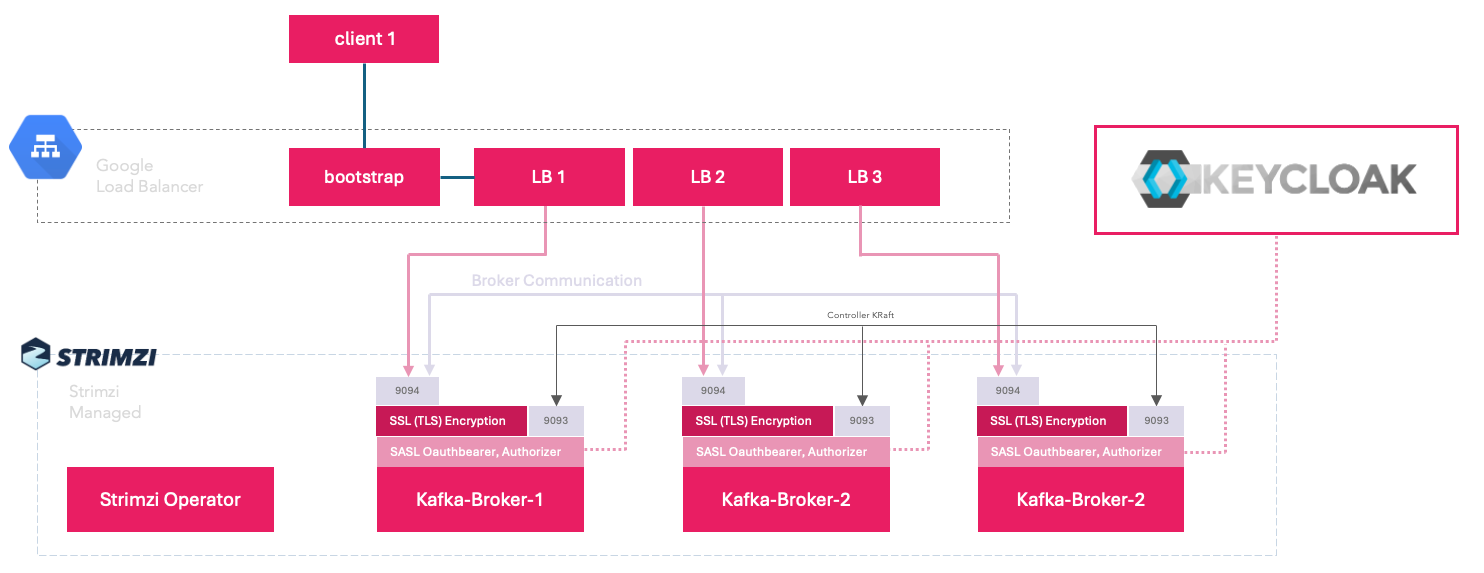
For this setup we will finally use and test everything needed in a production grade deployment:
- Google Cloud Kubernetes Engine
- Strimzi Kafka Operator 0.48
- Kafka Kraft Mode
- Encrypted Communication (TLS) with Clients
- OAuth Authentication, Strimzi Keycloak Authorizer
- Topic Replication Factor of 3
- Kafka Cluster Scalability via Strimzi Cruise Control
- One LoadBalancer service for the bootstrap (used for initial client connection and metadata discovery). One separate LoadBalancer service per broker (why? continue reading...)
Google Kubernetes Cluster Setup
Setting up a Google Kubernetes Engine (GKE) cluster is not the main focus of this article. For detailed instructions on provisioning a production-ready GKE cluster using Terraform, check out our dedicated blog post:
 Roman Hüsler
For this blog post and lab demonstration, I used Terraform to provision a GKE cluster with a dedicated node pool containing just one node. This keeps costs low for experimentation and testing.
In a real production environment, however, you should obviously use a dedicated node pool with at least three nodes (ideally spread across multiple availability zones - GKE regional cluster). Additionally, configure pod anti-affinity rules (and optionally topology spread constraints) on the Kafka pods to ensure high availability—preventing multiple broker replicas from scheduling on the same node and reducing the risk of correlated failures.
Strimzi makes this straightforward: you can define these directly in the template.pod.affinity section of your Kafka or KafkaNodePool resources (for KRaft deployments).
Strimzi Kafka Setup
Now for the setup of the strimzi kafka cluster on kubernetes. Take a short read on the https://strimzi.io/ homepage. Strimzi lets you run kafka on your kubernetes in various deployment configurations and it is widely used in production setups.
Strimzi Kubernetes Operator
Next, we deploy the Strimzi Cluster Operator as a basis, which handles all the heavy lifting: automating deployment, scaling (up and down), upgrades, monitoring, and maintenance of Kafka components.
For this lab setup, I installed it "as-is" using the official Helm chart with default values—no custom overrides needed for a quick start. Here's the command I used (targeting the latest stable version at the time, around 0.48.x)
 strimzi
Kafka Cluster Resources
For the demonstrations in this blog post, I deployed the Kafka cluster (and related resources like topics and users) using a custom/community Helm chart that bundles the necessary Strimzi Custom Resources (CRs).
Here's my kafka cluster yaml - part of the helm chart.
apiVersion: kafka.strimzi.io/v1beta2
kind: Kafka
metadata:
  name: kafka-cluster
  namespace: kafka
  labels:
    app: {{ include "opensight-strimzi-deployment.fullname" . }}
    chart: {{ include "opensight-strimzi-deployment.chart" . }}
    release: {{ .Release.Name }}
    heritage: {{ .Release.Service }}
spec:
  kafka:
    version: "4.1.0"
    # OAuth-based authorization using KeycloakAuthorizer for KRaft mode
    authorization:
      type: keycloak
      authorizerClass: "io.strimzi.kafka.oauth.server.authorizer.KeycloakAuthorizer"
      tokenEndpointUri: "https://auth.opensight.ch/auth/realms/master/protocol/openid-connect/token"
      clientId: "kafka-broker"
      delegateToKafkaAcls: false

    listeners:
      - name: controller
        port: 9093
        type: "internal"
        tls: false

      - name: plain
        port: 9092
        type: "internal"
        tls: false

      - name: external
        port: 9094
        type: "loadbalancer"
        tls: true
        authentication:
          type: oauth
          clientId: "kafka-broker"
          clientSecret:
            secretName: "kafka-oauth-client-secret"
            key: "client-secret"
          tokenEndpointUri: "https://auth.opensight.ch/auth/realms/master/protocol/openid-connect/token"
          validIssuerUri: "https://auth.opensight.ch/auth/realms/master"
          jwksEndpointUri: "https://auth.opensight.ch/auth/realms/master/protocol/openid-connect/certs"
          userNameClaim: "preferred_username"
        configuration:
          # Bootstrap LoadBalancer service (for initial client connection and metadata discovery)
          # Per-broker LoadBalancer services (one per broker for direct connections)
          brokers:
            - broker: 0
            - broker: 1
            - broker: 2

    # Kafka configuration
    config:
      offsets.topic.replication.factor: 3
      transaction.state.log.replication.factor: 3
      transaction.state.log.min.isr: 2
      default.replication.factor: 3
      min.insync.replicas: 2
      inter.broker.protocol.version: "3.6"
      log.message.format.version: "3.6"
      # KeycloakAuthorizer configuration properties
      strimzi.authorization.token.endpoint.uri: "https://auth.opensight.ch/auth/realms/master/protocol/openid-connect/token"
      strimzi.authorization.client.id: "kafka-broker"
      strimzi.authorization.allow.everyone.if.no.acl.found: "false"

  entityOperator:
    topicOperator: {}
    userOperator: {}

  cruiseControl:
    config:
      anomaly.detection.interval.ms: "300000"
      max.num.cluster.movements: "1250"
      metrics.window.ms: "300000"
      num.concurrent.partition.movements.per.broker: "5"
      num.metrics.windows: "20"
      num.proposal.precompute.threads: "1"
      sample.loading.check.interval.ms: "5000"
      self.healing.broker.failure.enabled: "true"
      self.healing.disk.failure.enabled: "true"
      self.healing.enabled: "true"
      self.healing.goal.violation.enabled: "true"
      topic.config.provider.class: "com.linkedin.kafka.cruisecontrol.config.BrokerSetAwareTopicConfigProvider"
    resources:
      limits:
        cpu: 500m
        memory: 1Gi
      requests:
        cpu: 200m
        memory: 512Mi
After applying the resource definitions, I gave strimzi operator some time to setup the cluster, the load balancers on google cloud, the certificates, the users, the test-topic.
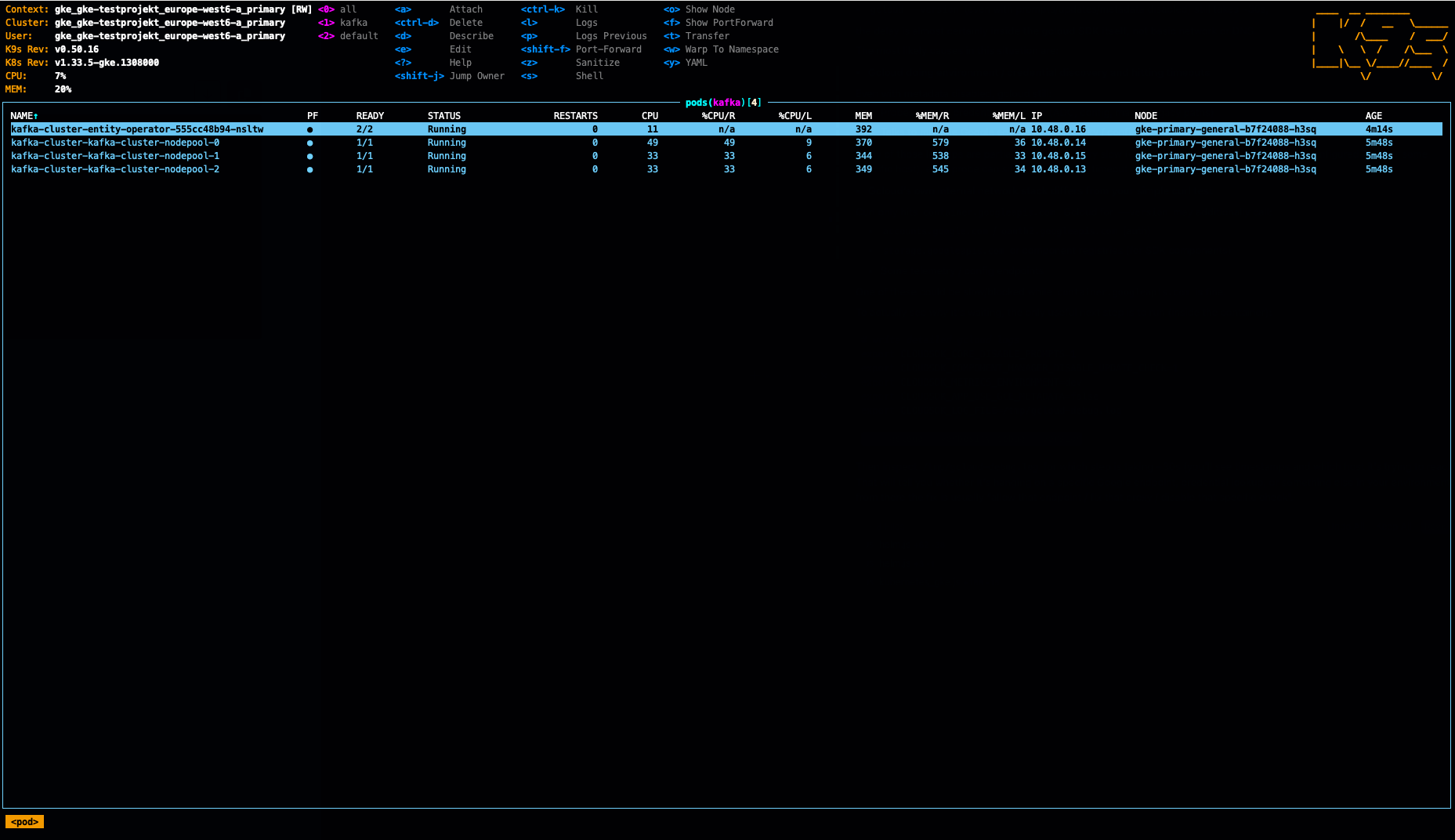
Yes, we have all the pods running on the same single node. As mentioned - that was just to save cost in the demo lab. I noticed also, per default there are no pod anti affinity rules defined - so that would have to be done by oneself.
Separate Load Balancer per Broker
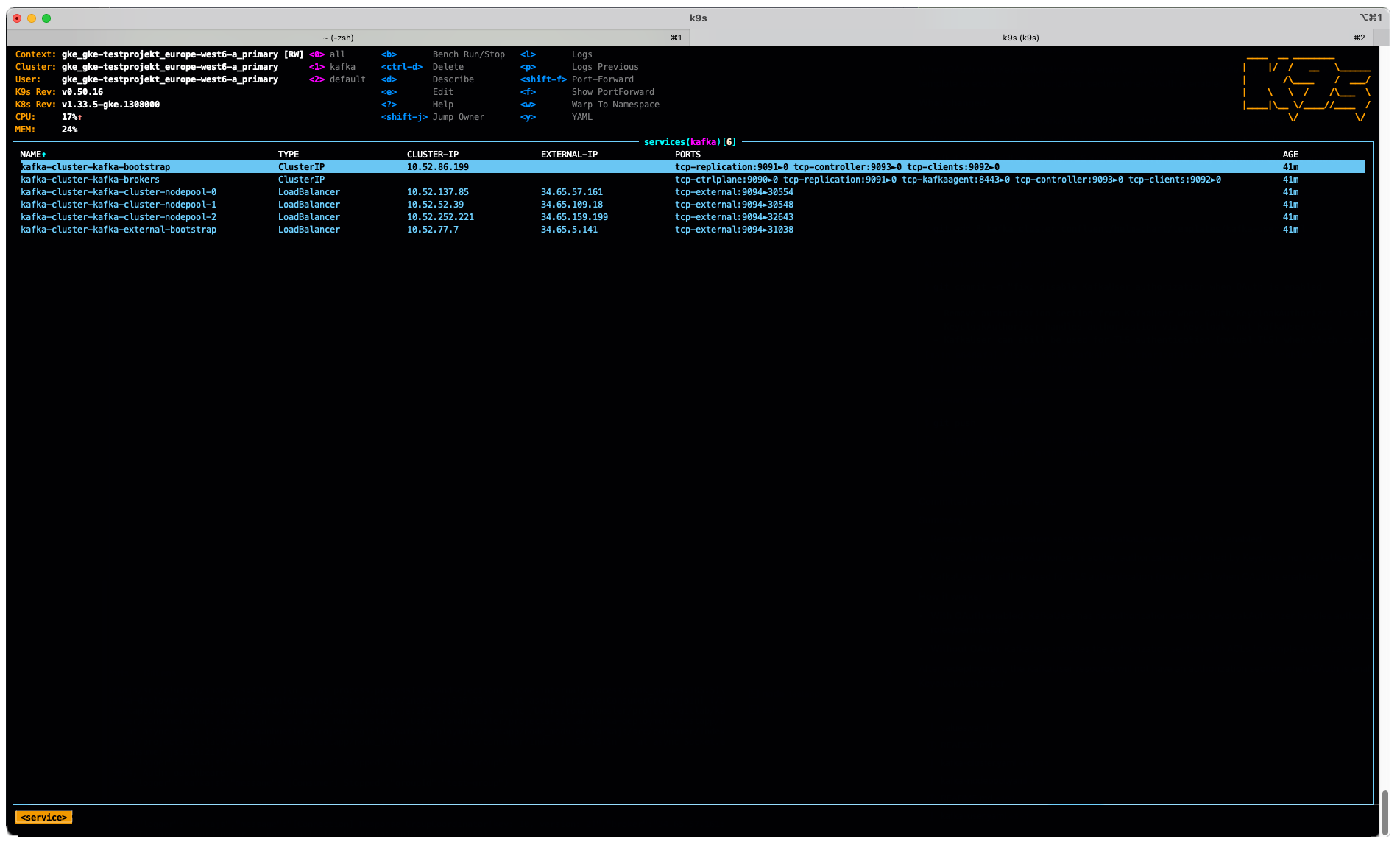
I wondered why you would use per-broker load balancers, even though it will route traffic to one broker pod only, as this has cost implications. More about the topic here in the strimzi blog. In a nutshell, we use the hyperscaler's load balancer because traffic is routed instantly to the correct node without extra miles via other nodes:
When Kubernetes creates the load balancer, they usually target it to all nodes of your Kubernetes cluster and not only to the nodes where your application is actually running. That means that although the TCP connections will always end on the same node in the same broker, they might be routed through the other nodes of your cluster. When the connection is sent by the load balancer to the node which does not host the Kafka broker, the kube-proxy component of Kubernetes will forward it to the right node where the broker runs.Keycloak OAuth Authorizer Config
Read the last part 4 of this blog series to get to know more about the keycloak integration. Each client that connects to kafka first retrieves an authorization token from our keycloak server.
I have setup a client in keycloak that the brokers can use to retrieve a token and communicate with each other.
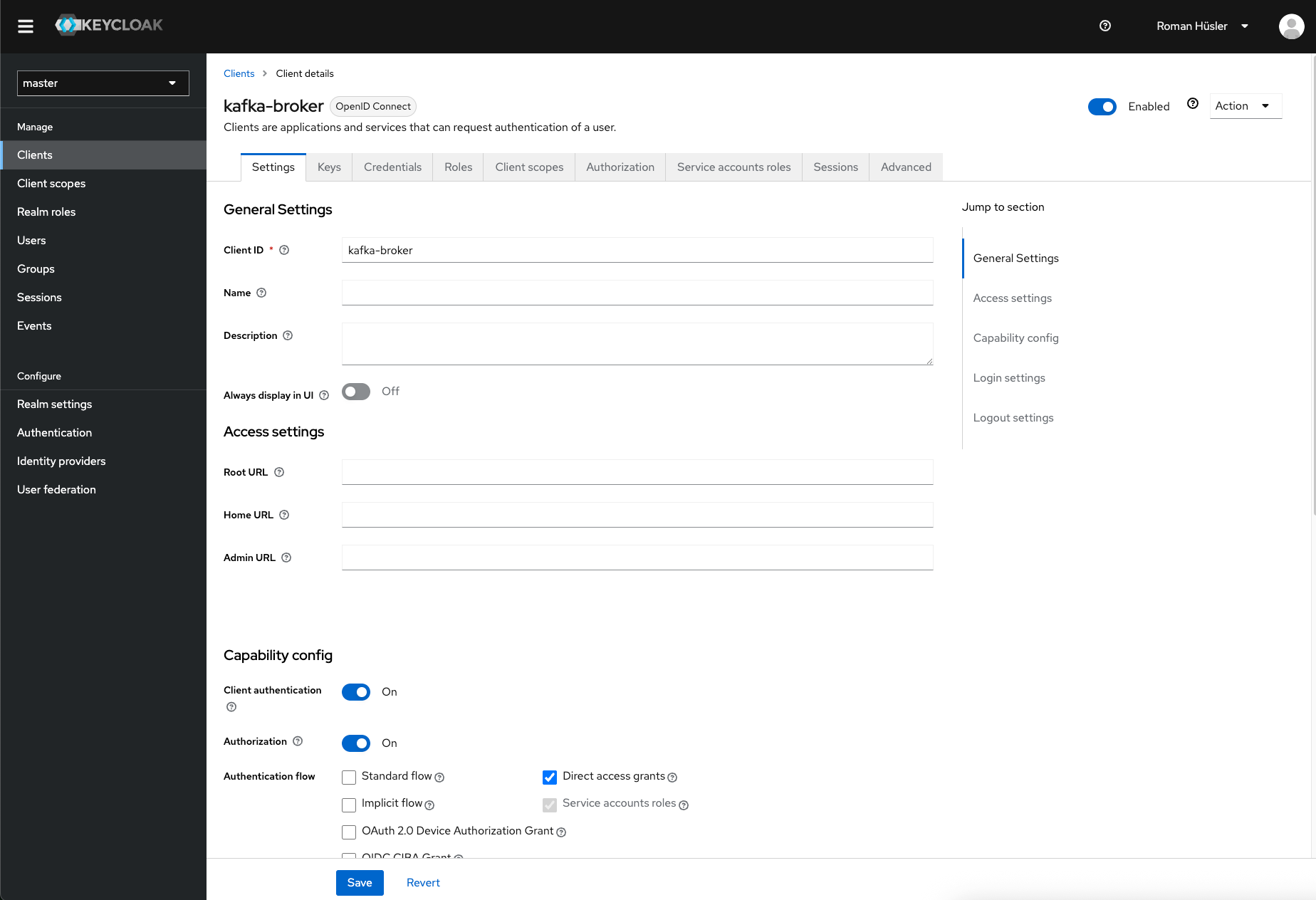
The secret of the keycloak kafka-broker (under credentials), I've put that in a kubernetes secret.
kubectl create secret generic kafka-oauth-client-secret \
  --from-literal=client-secret='YOUR_CLIENT_SECRET' \
  -n kafka
It will be used here: https://github.com/butschi84/kafka-enterprise-deployment/blob/main/5_cluster_google_kubernetes_engine/helm-chart/templates/kafka-cluster.yaml#L41
Connecting the test application
I've deployed a kafka user using strimzi here. Strimzi used its CA and generate a certificate for the user to connect. Let's export the certificates and private key and then connect the test application. The test application you can find here.
# get kafka cluster ca-certificate
kubectl get secret -n kafka kafka-user -o jsonpath='{.data.ca\.crt}' | base64 -d > ca.crt

# get kafka-user certificate
kubectl get secret -n kafka kafka-user -o jsonpath='{.data.user\.crt}' | base64 -d > user.crt

# get kafka-user private key
kubectl get secret -n kafka kafka-user -o jsonpath='{.data.user\.key}' | base64 -d > user.key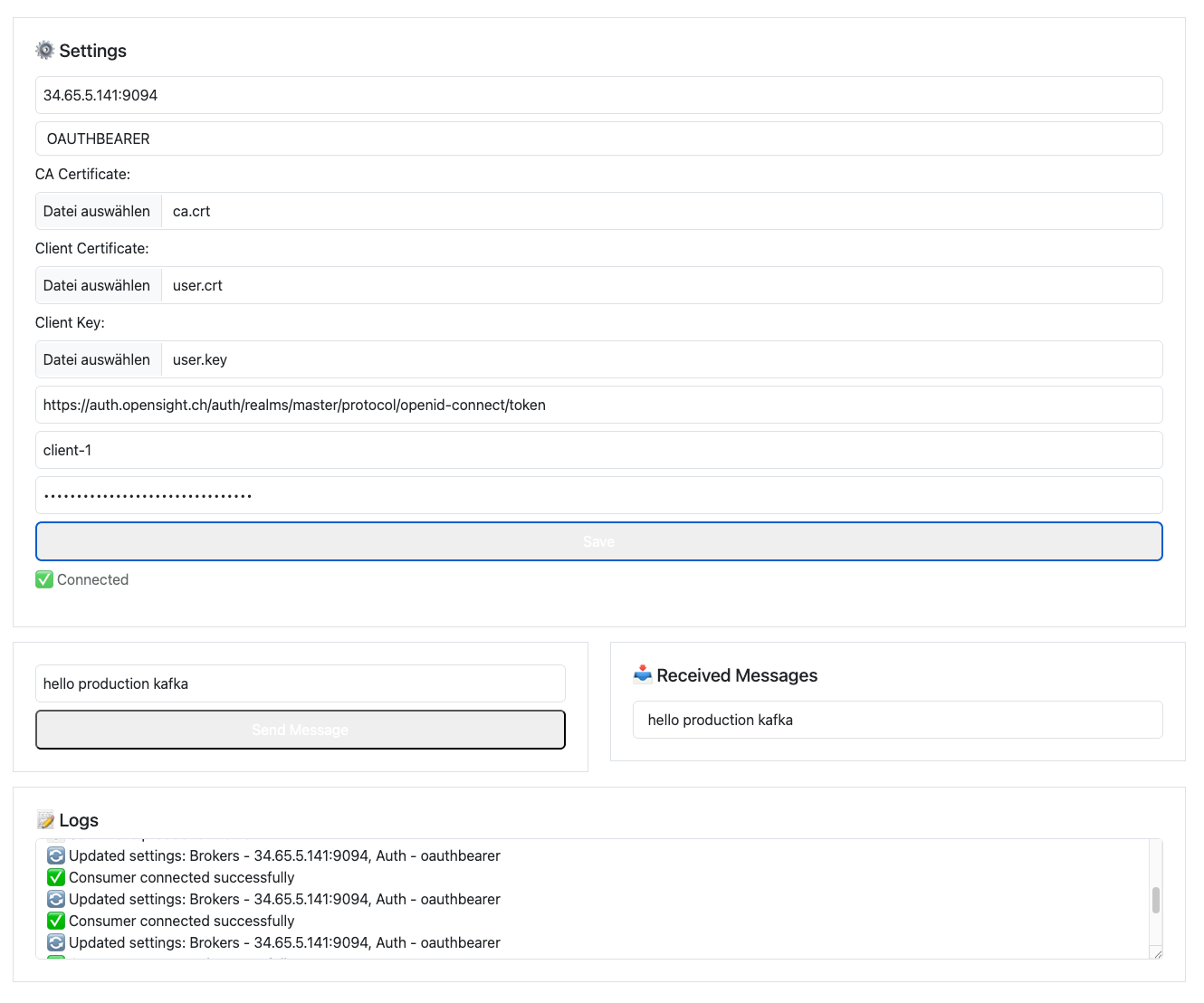
The cluster is working fine. I can produce and receive messages.
Cluster Scaling - Strimzi Cruise Control
First, I try Scaling up the Cluster from 3 brokers to 5. The test application in our GIT repository got a little update so we are now able to show kafka topic repliations stats. As expected - at the moment we got 3 partitions spread around 3 brokers.
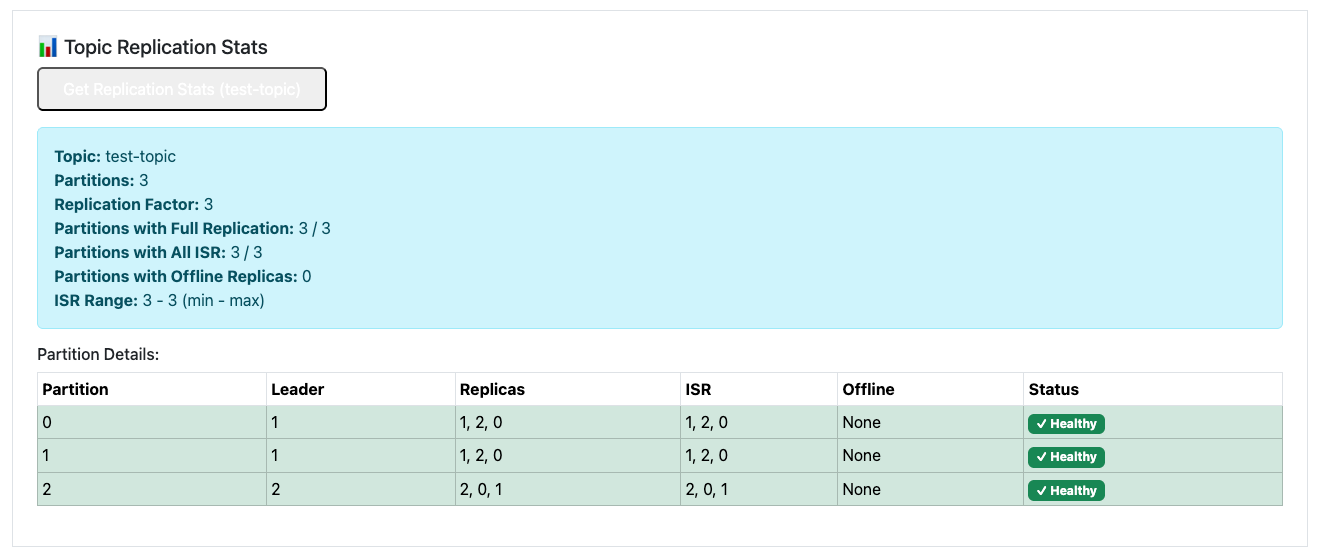
Let's simulate a real-world scenario: traffic to our Kafka cluster has increased significantly, and our current 3-broker setup is no longer sufficient. Scaling horizontally is one of Kafka's strengths, and Strimzi makes it incredibly straightforward.
To scale from 3 brokers to 5, we simply update the spec.replicas field in the broker KafkaNodePool resource (assuming a common production setup with separate controller and broker pools in KRaft mode).
# scale nodepool to 5 replicas
kubectl patch kafkanodepool kafka-cluster-nodepool -n kafka --type='json' -p='[{"op": "replace", "path": "/spec/replicas", "value": 5}]'

# add listeners for new brokers to route traffic to
kubectl patch kafka kafka-cluster -n kafka --type='json' -p='[{"op": "replace", "path": "/spec/kafka/listeners/2/configuration/brokers", "value": [{"broker": 0}, {"broker": 1}, {"broker": 2}, {"broker": 3}, {"broker": 4}]}]'

# we need now 5 partitions
kubectl patch kafkatopic test-topic -n kafka --type='json' -p='[{"op": "replace", "path": "/spec/partitions", "value": 5}]'

# strimzi cruise control - rebalance whole cluster
kubectl apply -f - <<EOF
apiVersion: kafka.strimzi.io/v1beta2
kind: KafkaRebalance
metadata:
  name: kafka-cluster-rebalance
  namespace: kafka
  labels:
    strimzi.io/cluster: kafka-cluster
spec:
  mode: "full"
EOF

# approve the rebalance operation
kubectl annotate kafkarebalance kafka-cluster-rebalance -n kafka \
  strimzi.io/rebalance=approve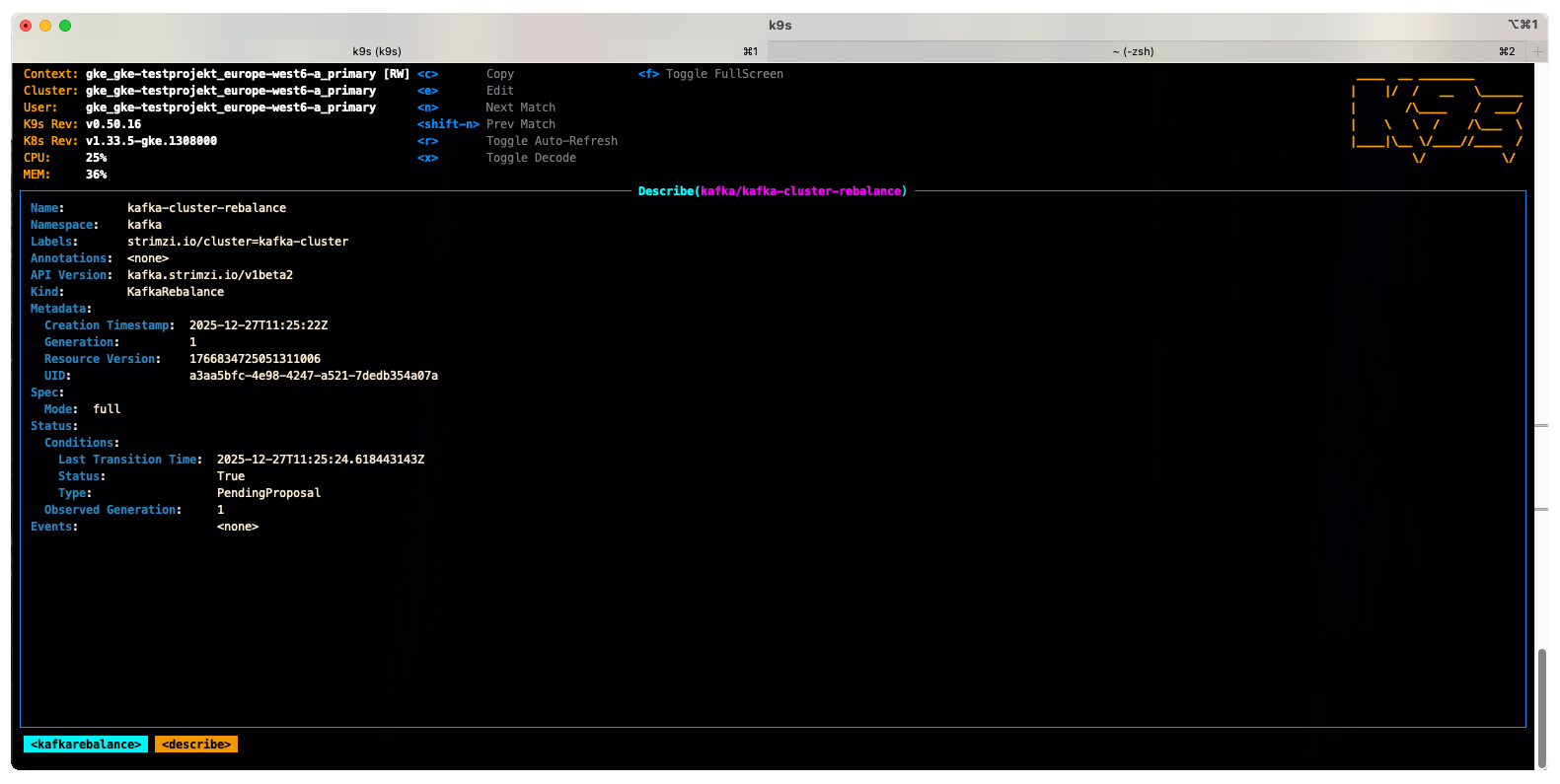
After giving Strimzi Cruise Control some time to generate and apply the rebalancing proposal, everything worked like a charm.
With a few minor adjustments (approving the optimization proposal via the KafkaRebalance resource), the partitions are now evenly distributed: our test topic's 5 partitions are spread across the 5 brokers, each with 2 in-sync replicas (for a total replication factor of 3). The cluster reports no under-replicated partitions, and all components are healthy.
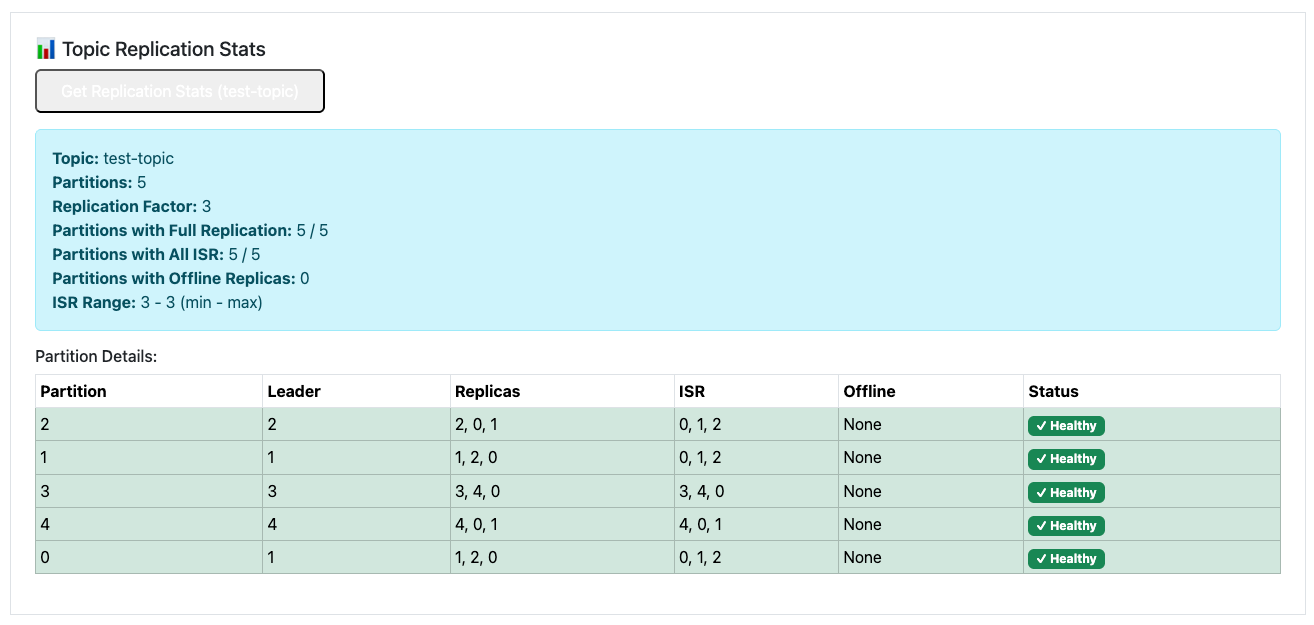
That was a full success. So now we scale down again from 5 brokers to 3 brokers.
First I do a rebalance and remove brokers 3 and 4.
# rebalance with strimzi cruise control from 5 to 3 brokers
kubectl apply -f - <<EOF
apiVersion: kafka.strimzi.io/v1beta2
kind: KafkaRebalance
metadata:
  name: kafka-cluster-remove-brokers
  namespace: kafka
  labels:
    strimzi.io/cluster: kafka-cluster
spec:
  mode: "remove-brokers"
  brokers: [3, 4]
EOF

# approve rebalance
kubectl annotate kafkarebalance kafka-cluster-remove-brokers -n kafka \
  strimzi.io/rebalance=approve
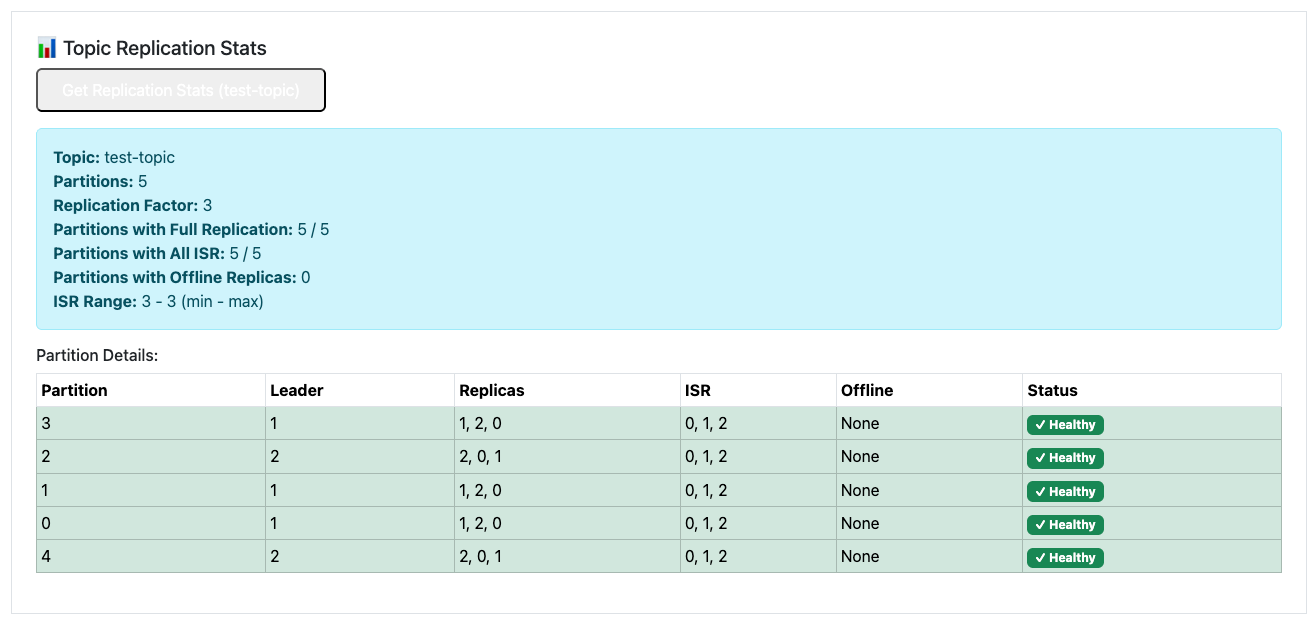
After a short amont of time, cruise control did its job and our 5 partitions are spread across only 3 brokers. I spare you the boring part of scaling down the nodepool again.
Conclusion
With this installment, we've successfully achieved most of the goals set out in this Kafka blog series: we've deployed a scalable, secure, and production-ready Apache Kafka cluster on Google Kubernetes Engine (GKE)—a true hyperscaler-managed Kubernetes service.
Using Strimzi, we've leveraged the power of Kubernetes Operators to manage a modern KRaft-based cluster with features like automated scaling, Cruise Control for intelligent rebalancing, and native integration for security and high availability.
Looking back, in Part 4 I initially used Confluent's Kafka images but ran into challenges: certain enterprise features (like Keycloak/OAuth integration) required manually adding Strimzi-provided Java libraries to the image since they're not freely available in the open-source Confluent distribution.
That's why, for this series, I switched fully to Strimzi—it provides a cleaner, more native Kubernetes experience without those workarounds.
One current limitation: Strimzi doesn't include a built-in Schema Registry. In a potential Part 6, I'll explore adding observability (Prometheus/Grafana metrics, tracing) and investigate Schema Registry options—possibly Confluent's or Apicurio Registry—and test compatibility with our OAuth-based authorization setup. We'll see if integration is smooth or requires additional configuration!
Thanks for following along. Feel free to share your experiences with Strimzi on GKE in the comments—especially around schema management or advanced security features.